Your ERP shows that an invoice was paid. It may not explain why it took two weeks, who found the missing receipt, or why someone had to join four exports in a spreadsheet before approving it.
If you lead transformation, operations or shared services, those are the details you need before changing the process. They determine what can be simplified, where a control is needed and whether automation would help.
Process discovery software helps establish how work happens across people and systems. To choose it well, ask each provider to map one of your real processes, including a case that went wrong. Then have the people who do the work check the result. A polished diagram is easy to demonstrate. A useful account of your operation takes more scrutiny.
Start with the decision you need to make
“We need better process visibility” leaves too much room for a successful demo and an unusable purchase. Name the decision the work must support.
For a transformation leader, it might be which parts of a process to standardize across countries and which local differences have a reason to exist. The output needs to show those differences and the evidence behind them.
For a shared-services or operations leader, it might be why supplier claims remain open after approval. The map needs to follow the handoff into the inbox, the supplier reply and the eventual credit, including who takes responsibility when a response never comes.
For an SAP programme owner, it might be what the implementation partner needs to know before a design workshop. The useful result is a reviewed account of the current work, its exceptions and the business requirements that follow. Agree the handoff with the partner before capture begins.
Write that decision into the evaluation brief. It gives everyone a way to judge whether the software has helped.
Match the capture method to the work
Different methods answer different questions. Your existing tools may already cover part of the need.
| Starting point | Useful when | What to check in an evaluation |
|---|---|---|
| System event logs | You need to analyze recorded transaction paths, volumes and timing | Which steps are recorded, which systems are covered and what happens outside those records |
| Desktop activity capture | You need to understand work performed in applications | How capture is controlled, how sensitive information is handled and how separate activities become a meaningful process |
| Guided walkthroughs and interviews | Decisions, exceptions and handoffs depend on people’s knowledge | How the tool follows up, compares different accounts and shows what still needs validation |
| Documents and existing process maps | You have a starting description of the work | How the documented procedure is checked against current practice |
These methods can complement each other. A walkthrough explains a workaround, but one person’s account cannot tell you how often it occurs across the business. Transaction data can help establish frequency, provided the relevant activity is recorded. Ask the provider to distinguish observed facts, participant accounts and assumptions.
If the main problem is work in email, spreadsheets and portals, include that work in the demonstration. A map that ends at the ERP boundary will leave your original question unanswered. For a fuller comparison, see process mining vs AI-led process discovery.
Inspect the map, then inspect one step
The overview should let a process owner follow the work without someone explaining every box. Opening a step should reveal enough detail to check it: who acts, what they use, what decision they make and where the description came from.
This invoice-reconciliation map in Duvo Clarity shows the routes through AP review, approval and supplier follow-up. You can see where a decision changes what happens next and which role owns the work.
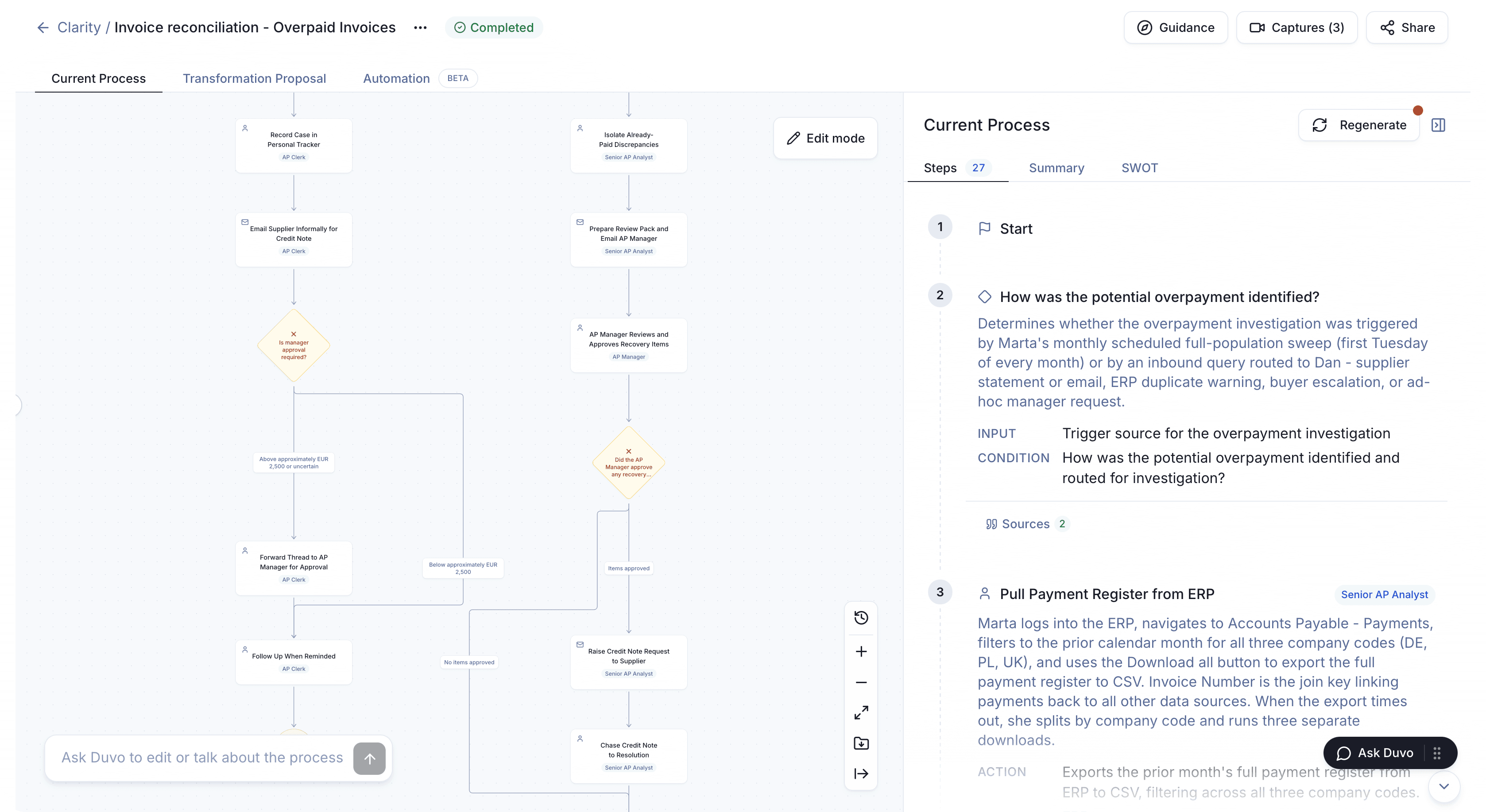
Open the process map at full size.
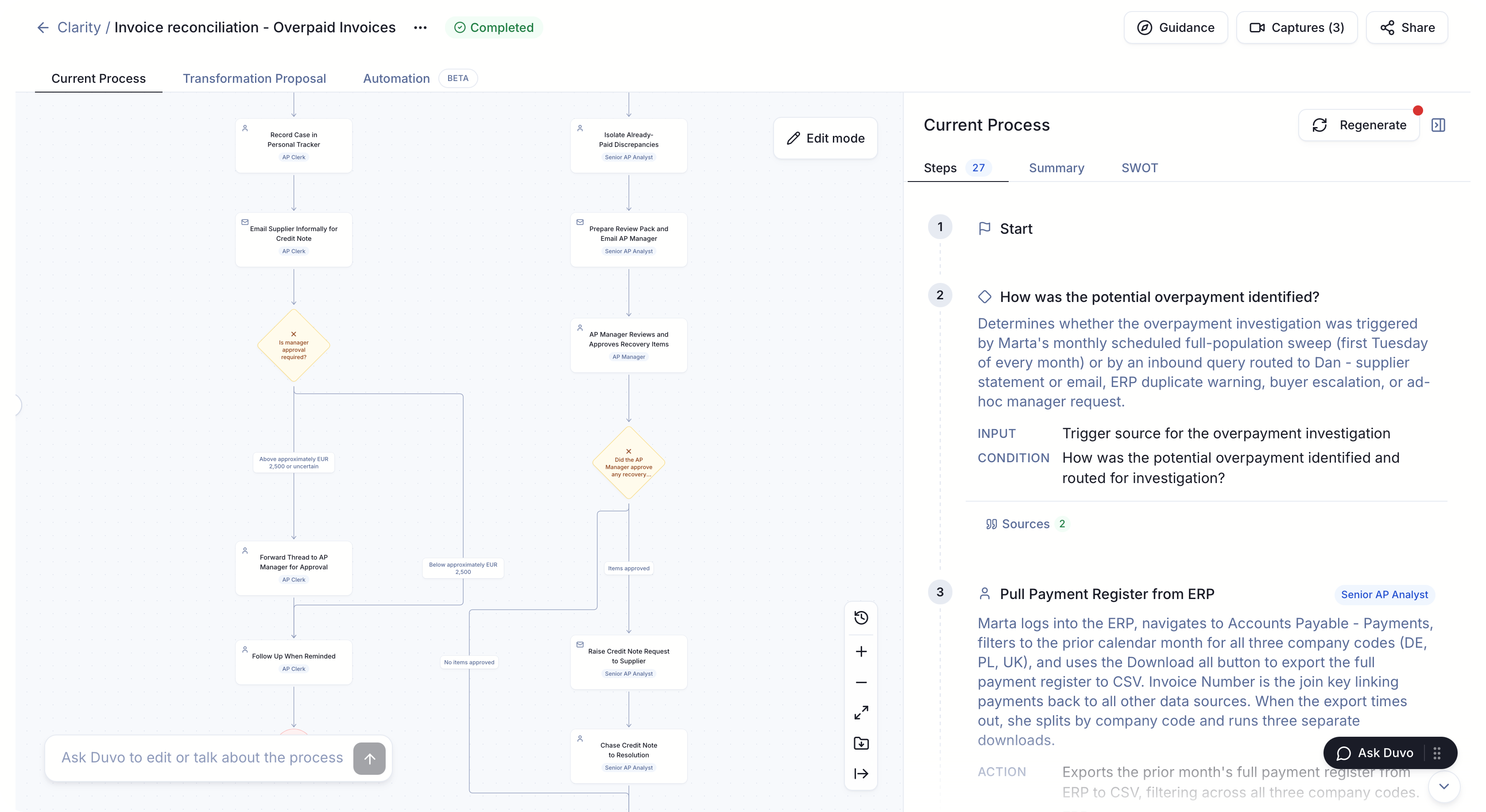
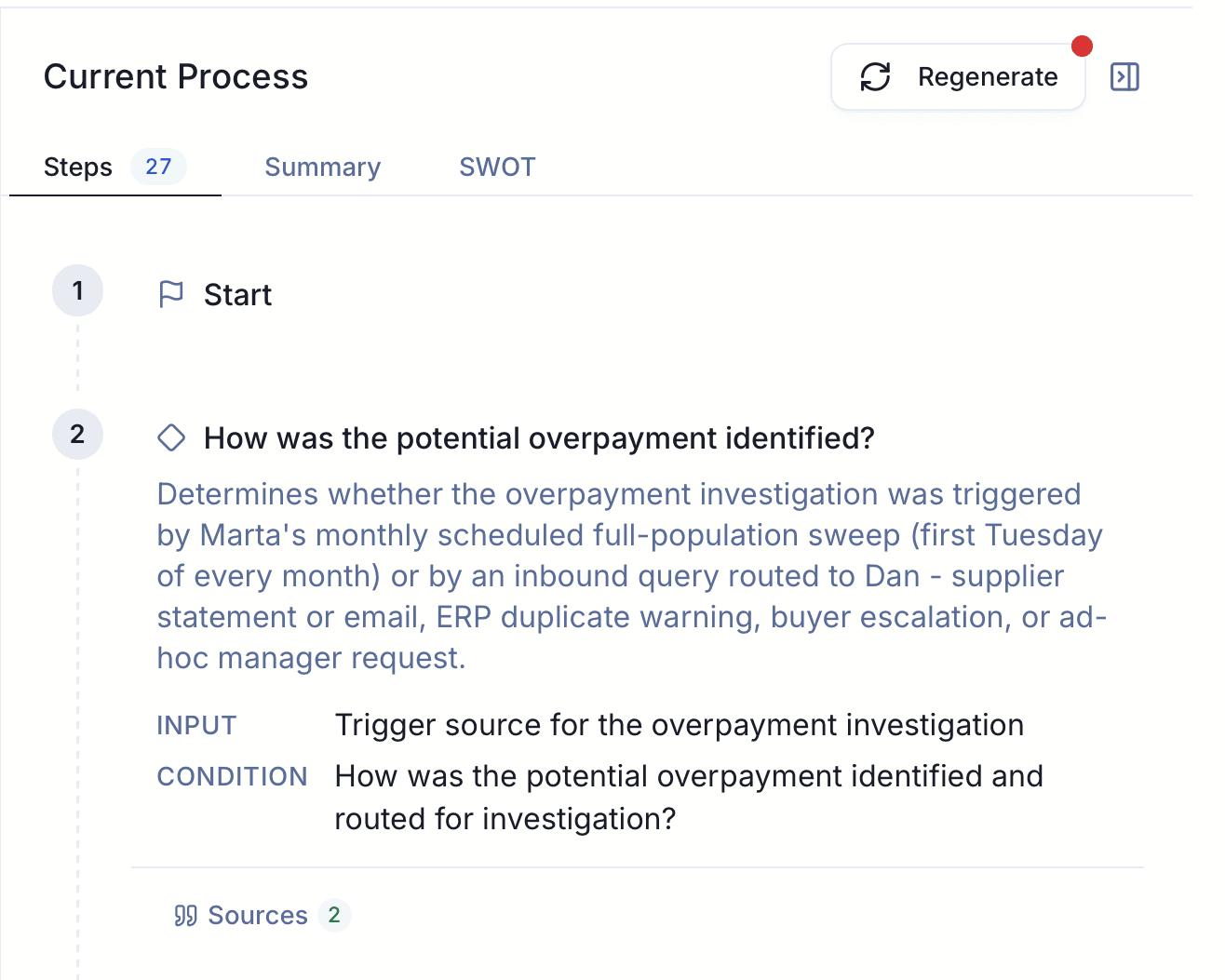
Look more closely at one step below. It explains how an overpayment investigation starts, distinguishes a scheduled review from an incoming query, and links to its sources. That is the kind of detail to inspect during an evaluation.
Follow a single exception through the map. If a supplier agrees to only part of a claim, who decides whether to accept it? Where is the outstanding amount tracked? If the tool cannot answer, establish whether the evidence was missing or the capture failed to include it. Both need to remain visible to the reviewer.
Use the same real case in every demo
Choose a process small enough for its owner to review, but representative of the problem you want to solve. Invoice reconciliation for one team is more useful than “finance transformation.” Bring an ordinary case and an exception, with the records your team is permitted to share.
Ask providers to demonstrate the following on that material:
| Ask the provider to… | Look for… |
|---|---|
| Capture the work across more than one role | The handoff between people, including what the recipient needs to continue |
| Explain an exception | Its trigger, the decision owner and the route back into the process |
| Show the basis for a step | A source you can inspect, or a clear indication that the step needs confirmation |
| Handle two conflicting accounts | An unresolved question for the process owner to settle, rather than a confident guess |
| Correct the map during review | A result the operator recognizes after the correction, including affected branches |
| Hand the result to its next user | A map and supporting detail that your process owner, training lead or implementation partner can use |
Give the map to an operator who was not the main interviewee. Ask them to walk through a case using it. Their corrections will tell you more about its usefulness than the number of steps generated.
Agree the effort and controls before buying
The software fee is only part of the commitment. Your people must explain the work, resolve disagreements and review the result. Ask who needs to participate, what preparation is required and which work the provider will do.
For screen capture, confirm how participants start and stop recording, which applications and documents they may share, who can access the recordings and how retention works. Involve your security team early enough to evaluate the proposed setup. A demo using public sample data does not settle those questions for your environment.
Also agree what you keep. That includes the map, supporting descriptions and the format needed by the next team. If an SAP partner expects a particular modelling convention or export, have them review a sample before the engagement starts.
Avoid accepting “ready for automation” as the only completion criterion. You may want to remove an approval, clarify ownership, train a new team or prepare requirements. Those can be worthwhile outcomes without automating anything.
Where Duvo Clarity fits
Duvo Clarity is worth evaluating when the process runs across people and existing systems, and much of the explanation lives with the people doing the work. It uses guided screen walkthroughs, AI interviews and documents to prepare a process map and improvement recommendations. The team reviews how the work is represented and resolves missing or conflicting details.
You can start process discovery without an ERP integration or a written procedure. Participants choose the screens and documents they share. That makes it possible to examine the work around an ERP as well as the steps inside it.
The initial result can support a process improvement, training or a migration decision. If you later choose automation, its system access, controls and production scope are agreed separately. A reviewed map does not authorize changes to your systems.
Duvo’s free process discovery offer covers one business process. You keep the map and recommendations, with no automation commitment. Bring a process owner, the people who do the work and the question you need the map to answer.
What should count as a successful evaluation?
Before starting, agree that the process owner can follow the main route and relevant exceptions, check the important steps against their sources, and identify anything still unresolved. The person receiving the output should confirm that it supports the decision you named at the beginning.
For an invoice-reconciliation team, that could mean locating the manual preparation that delays review and agreeing who owns a stalled supplier claim. For a migration team, it could mean handing the implementation partner a reviewed requirement with its business rationale.
Ask each provider to show that result on your process. Then compare the quality of the output, the work your team had to contribute and the total price of the agreed scope.