Map and improve your process for automation.
Show Duvo how your team works. Duvo maps the process and proposes an improved version for automation, ready for your review.
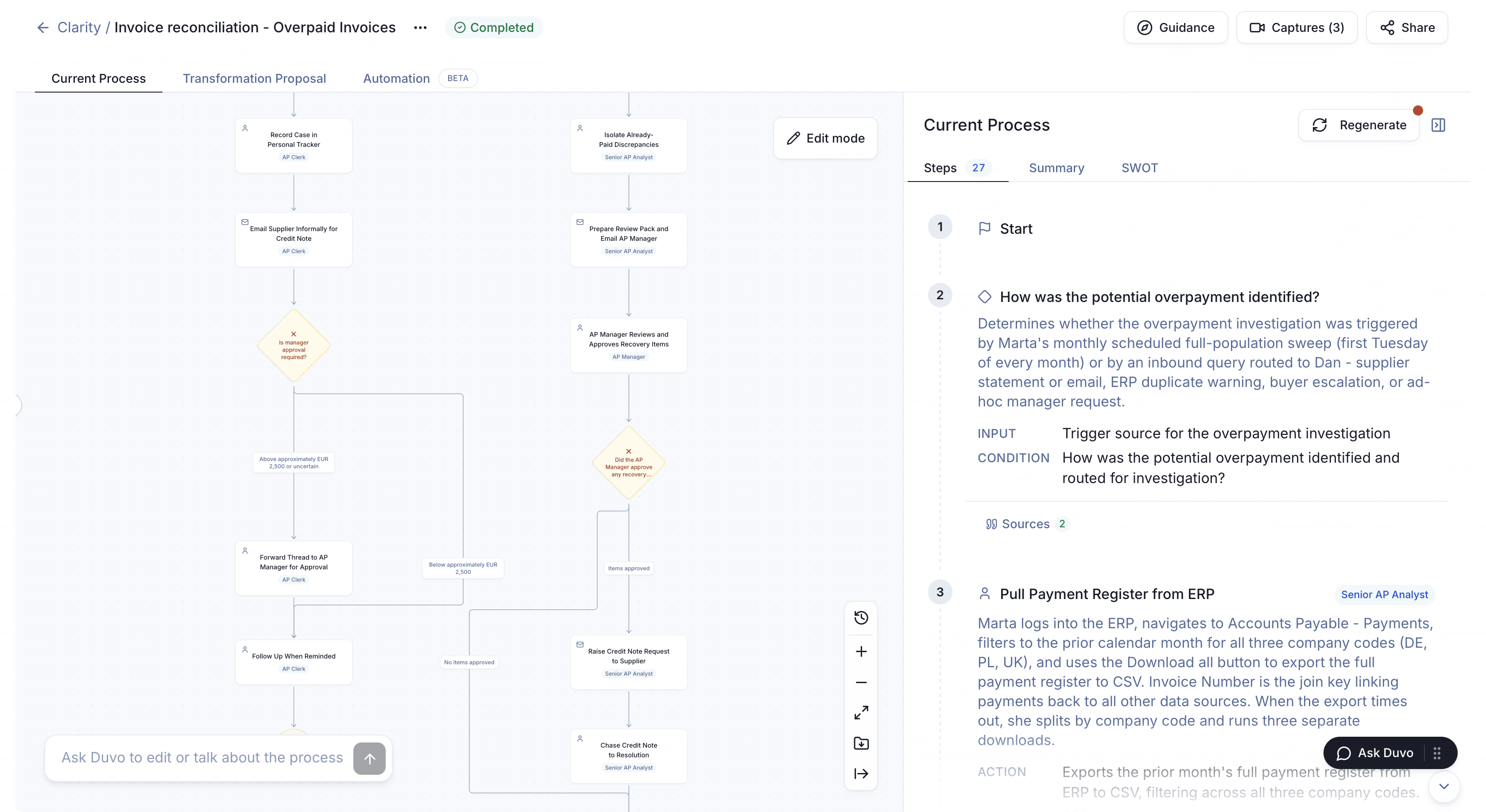
From process map to automation proposal.
Invoice-reconciliation example: a proposal for your team to review.
Current process
27 steps
How was the potential overpayment identified?
Monthly sweepMarta reviews the full population on the first Tuesday of each month.
Inbound query routed to DanSupplier statement or email, ERP duplicate warning, buyer escalation, or ad hoc manager request.
- Input
- Trigger source for the overpayment investigation.
- Condition
- How was the potential overpayment identified and routed for investigation?
2 sources attached
View source stepKeep each decision tied to its evidence.
This invoice reconciliation starts from a monthly sweep or an inbound query. The map records each route, who performs each step and the sources behind it.
Keep each decision tied to its evidence.
This invoice reconciliation starts from a monthly sweep or an inbound query. The map records each route, who performs each step and the sources behind it.
Current process
27 steps
How was the potential overpayment identified?
Monthly sweepMarta reviews the full population on the first Tuesday of each month.
Inbound query routed to DanSupplier statement or email, ERP duplicate warning, buyer escalation, or ad hoc manager request.
- Input
- Trigger source for the overpayment investigation.
- Condition
- How was the potential overpayment identified and routed for investigation?
2 sources attached
View source stepShow the process in the way that suits your team.
Duvo guides the capture and prepares the map. Start with the people who know the process, without an integration project or a written SOP.
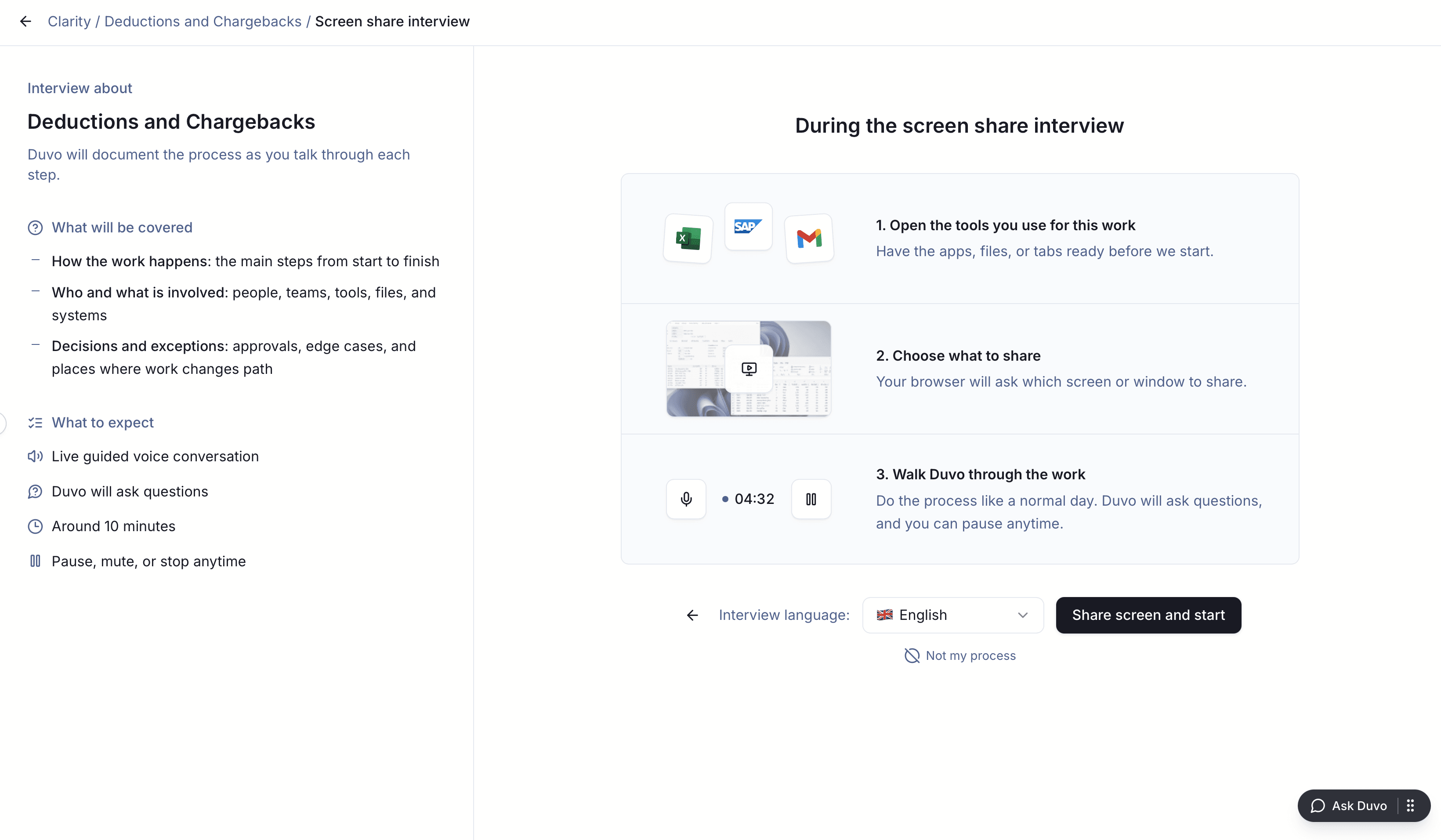
During the screen share interview
1. Open the tools you use for this work
Have the apps, files, or tabs ready before we start.
2. Choose what to share
Your browser will ask which screen or window to share.
3. Walk Duvo through the work
Do the process like a normal day. Duvo will ask questions, and you can pause anytime.
See the process on the actual screens.
Operators show their actual screens and explain the decisions behind each step. Follow up on the evidence and the handoff to the next person.
See the process on the actual screens.
Operators show their actual screens and explain the decisions behind each step. Follow up on the evidence and the handoff to the next person.
During the screen share interview
1. Open the tools you use for this work
Have the apps, files, or tabs ready before we start.
2. Choose what to share
Your browser will ask which screen or window to share.
3. Walk Duvo through the work
Do the process like a normal day. Duvo will ask questions, and you can pause anytime.
Choose what to do with the reviewed process.
Process Catalogue
Keep reviewed processes in one searchable record.
Process knowledge is scattered across people, documents, and local ways of working.
- Search by workflow, team, role, system, or outcome
- See ownership, decisions, handoffs, and exceptions in context
- Keep source evidence attached as coverage grows
Onboarding & Training
Turn expert practice into role-specific guidance.
You are onboarding, cross-training, or preserving knowledge through a role change.
- Tasks, systems, and responsibilities for each role
- Guidance for decisions beyond the happy path
- Exceptions, escalation routes, and approved practices that can be updated
Process Improvement
Find where performance breaks and what to change first.
Delay, rework, costly variation, or control gaps keep recurring.
- Root causes behind delay, rework, and failed handoffs
- Priorities ranked by value, frequency, risk, and effort
- A target process with owners, dependencies, and success measures
Transformation Roadmap
Decide what changes, in what order, and why.
A programme crosses teams, markets, systems, or implementation partners.
- Agreed scope across processes, variants, markets, and systems
- Priorities ranked by value, risk, effort, and readiness
- Sequenced workstreams with owners, boundaries, and decision gates
From evidence to an approved record.
Your team reconciles the variants and approves the result. The record stays customer-owned, linked to its evidence and ready for internal teams or implementation partners.
Multilingual capture · L4 process detail · BPMN 2.0 XML export
What teams ask before they start.
How long does Process Intelligence take?
The first scope is one workflow, team, or department. We agree the timeline around its variants, participants, and available evidence, then review the captured process with your team before any next move is approved.
Do we need system access or integration to start?
No. Duvo can begin with screen walkthroughs, guided AI interviews, and documents. Live system access and an API project are not required for the first reviewed process.
Is this employee monitoring software?
No. Nothing watches people in the background. Each participant starts and ends a guided walkthrough or interview, and the resulting process is reviewed by the team.
What do we receive?
You receive reviewed L4 process evidence and the selected output: a process catalogue, training guide, improvement plan, transformation roadmap, migration fact base, or reliable automation brief. BPMN 2.0 XML is available for reuse downstream.
How is our evidence secured?
Duvo holds SOC 2 Type II, ISO 27001, and ISO 42001, supports GDPR requirements, and operates in line with NIS2. Your own IT, security, privacy, and works-council review requirements still apply.