
Process mining shows you what your systems recorded. AI-led process discovery shows you how the work actually gets done, including the emails, spreadsheets, supplier portal checks and judgement calls that never reach a system log. If you are preparing to automate a process, start with AI-led discovery. Automation breaks on exceptions and workarounds, and those live with the people who run the process.
Process mining tools such as Celonis, SAP Signavio Process Intelligence, UiPath Process Mining and Microsoft Power Automate rebuild a process from event data in your ERP and other systems. AI-led process discovery tools such as Duvo Clarity interview the people who do the work, by voice or while they share their screen, and draft a map in which every step links to its source. Clarity needs no system access or integration for the first map, and Duvo can then automate the approved steps in the systems you already use.
Process mining vs AI-led process discovery
Process mining reconstructs a process from event logs. The IEEE Task Force on Process Mining describes it as extracting knowledge from the event logs that information systems record. Each event names a case, such as an invoice or an order, the activity performed on it and when it happened. AI-led process discovery builds the process from the people who run it: short AI interviews, screen walkthroughs, meeting recordings and the SOPs and spreadsheets you already have.
| Process mining | AI-led process discovery | |
|---|---|---|
| What it reads | Event logs from your ERP, CRM and other connected systems | AI interviews with the people who do the work, screen walkthroughs, meeting recordings and documents |
| What it shows best | How often each path occurs, how long cases wait and where they loop | How each step is done, who decides, which system is used and what happens when something goes wrong |
| What it needs to start | Event data extracted from the systems in scope, through connectors or a data pipeline | The people who run the process. No system access or integration for the first map |
| What it cannot see | Work that leaves no event in a connected system: email, spreadsheets, portals, phone calls, judgement | Exact volumes across every case, which system reports or mining can add |
| What you get | Process graphs, variant and throughput analysis, conformance dashboards | A reviewed process map with sources and open questions, and a proposal for what to change |
Two other approaches sit alongside these. Task mining records desktop activity, such as clicks and application switches, through software installed on employees' computers. Workflow documentation tools record one person doing a task and turn it into a step-by-step guide.
Which to use before you automate
An automation needs the steps, the decisions, the systems each step touches and the rules for every exception. Most of that knowledge sits with people. Take an invoice blocked for a missing goods receipt. The ERP records the block and, days later, the release. The AP clerk who released it can tell you what happened in between: they emailed the warehouse, tracked the replies in a spreadsheet, chased the supplier when the delivery note did not match and released the invoice once someone confirmed. An automation has to follow that sequence, and the event log holds only its first and last step.
- Start with AI-led discovery when the process crosses an ERP, inboxes, spreadsheets and supplier portals, when the documentation is out of date, or when nobody can say how exceptions are handled.
- Add process mining when it is already connected and you need to size a problem across every recorded case, such as how many invoices hit the same block each month.
- Use task mining when the question is which clicks slow down a task you already understand. It records activity, not the reasons behind it.
If your next step is an SAP S/4HANA migration rather than automation, the same applies: the programme needs the process as it runs today, including the spreadsheets around SAP. See how to prepare for SAP fit-to-standard workshops.
Process discovery tools compared
| Tool | Approach | Starts from |
|---|---|---|
| Duvo Clarity | AI-led process discovery | AI interviews by voice or screen share in 11 languages, meeting recordings, SOPs and spreadsheets. No system access needed |
| Celonis | Process mining, with task mining | Event data from connected systems |
| SAP Signavio Process Intelligence | Process mining | Event data from SAP and non-SAP systems |
| UiPath Process Mining | Process mining, with task mining | Event data from connected systems |
| Microsoft Power Automate Process Mining | Process and task mining | Event data and desktop recordings |
| IBM Process Mining | Process mining, with task mining | Event logs |
| Apromore, now part of Salesforce | Process mining, with task mining | Event logs from connected systems or uploaded files |
| KYP.ai, Skan, Automation Anywhere Process Discovery | Task mining and automated discovery | Desktop activity recorded by software installed on employees' computers |
| Scribe, Tango, Guidde | Workflow documentation | A browser extension or desktop app recording one person doing a task |
Every other tool in this table builds its picture from event logs, desktop activity or a recording of someone's screen. None of them asks the people who run the process why they do what they do, and that reasoning is what an automation has to follow. Competitor details come from each vendor's website, checked on 16 October 2026.
Choose Duvo Clarity when the process runs across people and systems and you plan to automate it. A mining platform fits when the process lives inside connected systems and your question is volume and timing. For a how-to guide to one task, a documentation tool is enough.
For a fuller buying checklist, read how to choose process discovery software.
What you get from Duvo Clarity
Clarity's AI interviews each person about their part of the process. An interview takes around 10 minutes, runs by voice or with screen sharing in 11 languages, and each person starts and stops their own. Clarity can also join process meetings on Teams, Zoom, Meet or Webex, and read the SOPs, spreadsheets and recordings you already have.
All interviews feed one map. Each step shows which role does it and in which system, and links to what someone said, a document page or a screenshot. Gaps become open questions you send to the person who knows the answer. Your team edits the map and the process owner approves it.
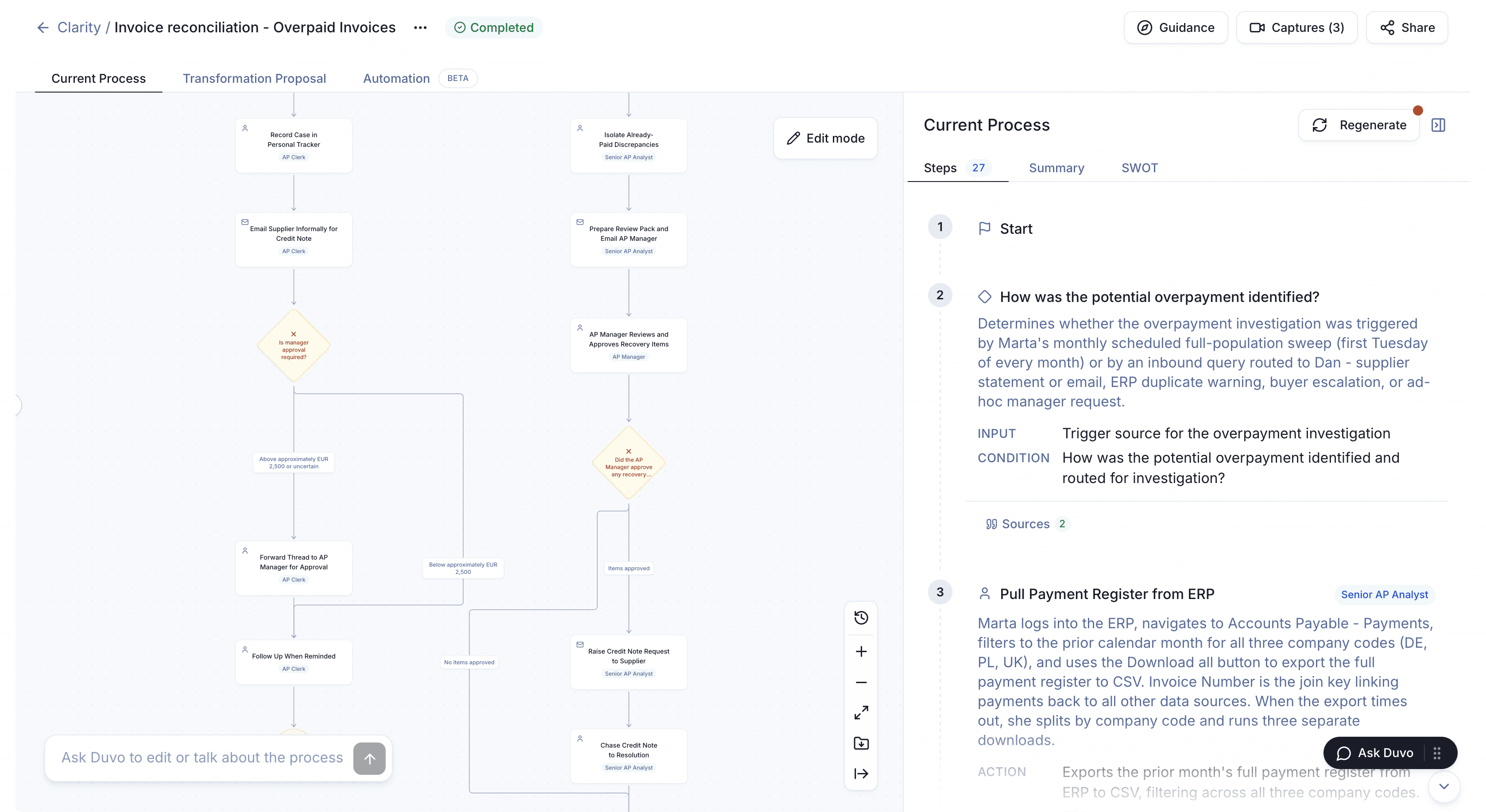
Clarity then proposes what to change. Each step is labelled automatable, partly automatable or manual, with the reason, and the proposal estimates a value range for money recovered, costs avoided and risk reduced, with the assumptions behind each figure. Export the map as BPMN or an image, or send it to SAP Signavio if your programme uses it.
Nothing watches people in the background: each participant starts and ends their own interview. Duvo holds SOC 2 Type II, ISO 27001 and ISO 42001.
Once the process owner signs off the map, Duvo can automate the approved steps in your existing systems. Duvo's automation results with retailers include Rohlik Group, where invoice reconciliation protected €2.1M in revenue and €1.4M in margin in a year across five markets, and Notino, where supplier bonus reconciliation went from 70 days to 15.
Map one of your processes free for two weeks in an Enterprise trial guided by Duvo. You keep the map and the proposal, with no automation commitment. To start on your own, the Free plan at app.duvo.ai includes 2 Clarity interviews.
Frequently asked questions
Process mining or AI-led process discovery: which should we use to understand a process before automating it?
Start with AI-led process discovery. Automation has to handle the decisions, exceptions and workarounds that people carry out in email, spreadsheets and supplier portals, and an event log does not record them. Process mining is worth adding when it is already connected and you need to measure how often a path occurs across every recorded case.
What is AI-led process discovery, and which tools do it?
AI-led process discovery means an AI interviews the people who run a process, by voice or while they share their screen, reads the documents and recordings that already exist, and drafts a process map with every step linked to its source. Duvo Clarity works this way: interviews take around 10 minutes, run in 11 languages and need no system access.
What software documents employee workflows from interviews and screen recordings?
Duvo Clarity documents a whole process from AI interviews, screen walkthroughs, meeting recordings and existing documents, then drafts a reviewed map and a proposal for what to change. Scribe, Tango and Guidde record one person doing a task and turn it into a step-by-step guide.
Which tools can map business processes without ERP event logs?
AI-led process discovery tools such as Duvo Clarity map a process from interviews, screen walkthroughs and documents, so no event logs, system access or integration are needed for the first map. Process mining tools such as Celonis, SAP Signavio Process Intelligence and UiPath Process Mining start from event data extracted from your systems.
Which process discovery platforms should an enterprise compare?
Start with Duvo Clarity if the process crosses people and systems and you plan to automate it, because it captures the decisions and exceptions an automation has to follow. If you also need to measure volumes from event logs, add a process mining platform such as Celonis, SAP Signavio Process Intelligence or UiPath Process Mining. Run each on the same real process and compare what you can act on.
Can process mining and AI-led process discovery be used together?
Yes. Discovery gives you the steps, decisions and exceptions, including the work outside your systems. Mining measures how often the recorded paths occur. Clarity exports maps as BPMN and can send them to SAP Signavio.